리액트 라이프사이클
리액트 라이프사이클
- 페이지에 컴포넌트가 생성되고, 수정되고, 사라지는 순서를 의미
- React에서 클래스 컴포넌트를 사용하면, 9개의 메소드를 통해 작업 흐름을 제어할 수 있다

리액트의 라이프사이클은
클래스형 컴포넌트로 찢겨져 있는 메소드들을 찾아 사용하는 과정이다
-> 그 중 하나가 useState()
마운트
- constructor : 새로운 컴포넌트를 생성할 때 마다 실행
- getDerivedStateFromProps : props를 state에 넣을 때 사용
-> 컴포넌트가 마운트될 때와 업데이트가 될 때 실행된다
- render : 준비해놓은 UI를 랜더링할 때 실행된다
- componentDidMount : 페이지에 컴포넌트가 나타난 직후 실행된다
업데이트
- getDerivedStateFromProps
- shouldComponentUpdate : true를 리턴 시 다음 라이프사이클 메소드가 계속 실행된다.
만약 false를 리턴할 경우 작업이 중지된다.
- getSnapshotBeforeUpdate : 컴포넌트 업데이트 직전의 값을 snapshot에 저장한다.
또한 업데이트 직전에 실행된다.
- componentDidUpdate : 컴포넌트 업데이트 직후 실행된다.
언마운트
- componentWillUnmount : 컴포넌트가 사라지기 직전에 실행되는 메서드
Infinite
| 컴포넌트가 렌더링해 API 요청을 보내고, 받아온 데이터를 state.users에 저장해 화면에 사용 |
import React, { Component } from 'react';

class Infinite extends Component {

  state = {
    users: []
  }

  render() {
    const getDates = async() => {
      const response = await fetch('https://jsonplaceholder.typicode.com/users')
      const datas = await response.json()
      console.log("리랜더링")
      return datas
    }

    getDates()
      .then((datas) => this.setState({users: datas}))

    return (
      <div>

      </div>
    );
  }
}

export default Infinite;
이 경우 랜더 안에서 작성할 경우
=> render가 계속 실행되기 때문에 무한 랜더링 발생(Infinite Loop)
- render()는 state나 props가 바뀔 때마다 자동으로 실행
-> setState()를 호출하면 다시 render() 실행
-> 그런데 render() 안에서 또 setState() 호출
-> 무한 렌더링 (Infinite Loop) 발생
<콘솔>

무한히 리랜더링 되고 있는 상태
-> 이렇게 정상적인 코드인데 무한히 동작하는 등 오류가 발생하는 것을
=> 사이드이펙트(Side Effect)라고 한다
따라서 무한 랜더링을 막기 위해 componentDidMount사용
import React, { Component } from 'react';

class Infinite extends Component {

  state = {
    users: []
  }

  componentDidMount(){
    const getDates = async() => {
      const response = await fetch('https://jsonplaceholder.typicode.com/users')
      const datas = await response.json()
      console.log("리랜더링")
      return datas
    }

    getDates()
      .then((datas) => this.setState({users: datas}))
  }

  render() {

    return (
      <div>

      </div>
    );
  }
}

export default Infinite;
-> 전체 코드를 componentDidMount 안에서 사용
<콘솔>
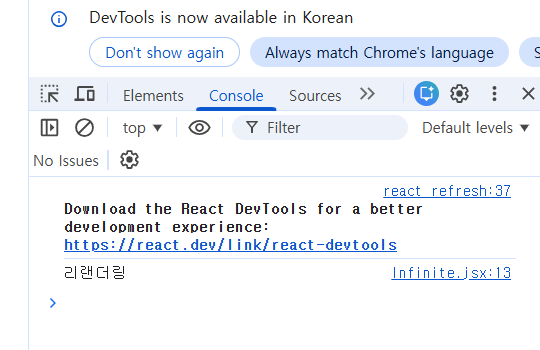
render 안에서 fetch나 setState를 사용하지 않아야 하고
API는 componentDidMount에서 호출
render는 화면 표시 역할만 해야함
-> 리랜더링은 한번만 일어난다
LifeCycleContainer
<LifeCycleContainer>
import React, { Component } from 'react';
import LifeCycleComp from './LifeCycleComp';

const getRandomColor = () => {
  return '#' + Math.floor(Math.random() * 16677215).toString(16)
  // toString(16): 16진수 문자열로 바꾸어 달라는 뜻
}

class LifeCycleContainer extends Component {

  state = {
    color : "#000"
  }

  handleColorOnClick = () => {
    this.setState({
    // 위에 state값이 있기 때문에 this.setState() 형태로 state값을 바꿔주어야 한다
      color : getRandomColor()
    })
    console.log(this.state.color)
  }

  render() {
    return (
      <div>
        <button onClick={this.handleColorOnClick}>RANDOM COLOR</button>
        {/* 클래스형 컴포넌트이기 때문에 자기 자신을 소환해야 해서 this를 사용해야한다 */}
        <LifeCycleComp color={this.state.color} />
      </div>
    );
  }
}

export default LifeCycleContainer;
<LifeCycleComponent>
import React, { Component } from 'react';

class LifeCycleComp extends Component {

  // 부모의 초기 컬러
  state = {
    number : 0,
    color : null
  }

  colorRef = null;

  handleNumberOnClick = () => {
    this.setState({
      number : this.state.number + 1
    })
  }

  // 생성자
  constructor(props){
    super(props)
    console.log("constructor props: ", props)
  }

  // V.D
  static getDerivedStateFromProps(nextProps, prevState){
    // V.D이 사용하는 메서드
    // nextProps: 다음에 변경될 props값 즉, 부모에게 넘겨받은 props값 / prevState: 이전의 상태값
    // -> V.D에서 nextProps와 prevState를 비교하는 것
    // 컴파일러가 제일 먼저 올려주는 키워드 static을 붙여야 한다
    // 이 메서드가 리랜더링을 시키는 것

    console.log("getDerivedStateFromProps: ", nextProps, prevState)

    if(nextProps.color !== prevState.color){
      return {color : nextProps.color}
    }
    return null;
  }

  // 마운트 단계 -> 랜더링 직후 실행
  componentDidMount(){
    console.log("마운트 직후 딱 한 번만 실행")
  }

  //// 업데이트 단계
  shouldComponentUpdate(nextProps, nextState){
    console.log("shouldComponentUpdate: ", nextProps, nextState)
    return nextState.number%5 !==0;
    // 5의 배수가 아닐 때에만 true -> 5의 배수일 때는 실행하지 않음
    // -> 업데이트에 조건을 주는 게 가능하다
  }

  getSnapshotBeforeUpdate(prevProps, prevState){
  // 혼자 사용할 수 없는 메서드 : componentDidUpdate와 함께 사용해야 한다
    console.log("getSnapshotBeforeUpdate: ", prevProps, prevState)
    if(prevProps.color !== this.props.color){
      return this.colorRef.style.backgroundColor;
    }
    return null;
  }

  componentDidUpdate(prevProps, prevState, snapshot){
    if(prevProps){
      console.log(`업데이트 직전 state ${prevProps.color}`)
    }
    if(snapshot){
      console.log(`업데이트 직전 색상 ${snapshot}`)
    }
  }
  // 이전값을 가지고 있기 때문에 되돌리기가 가능하다

  render() {
    return (
      <div>
        <div ref={(el) => this.colorRef = el}
          style={{
            width : "100px",
            height : "100px",
            backgroundColor : this.state.color,
            display : "flex",
            justifyContent : "center",
            alignItems : "center",
            color : "#000"
          }}
        >
          <h1>{this.state.number}</h1>
        </div>
        <button onClick={this.handleNumberOnClick}>PLUS</button>
      </div>
    );
  }
}

export default LifeCycleComp;
<결과화면>


'Frontend > React' 카테고리의 다른 글
| React 리액트 - useMemo() (0) | 2025.12.23 |
|---|---|
| React 리액트 - useEffect() (함수형 컴포넌트) (0) | 2025.12.18 |
| React 리액트 - useRef() vs useState() (0) | 2025.12.11 |
| React 리액트 - 레퍼런스(Ref) (0) | 2025.12.11 |
| React 리액트 - 맵(Map) (0) | 2025.12.10 |